When an elderly parent lives alone, family members often worry about small everyday things.
Did they wake up as usual? Did they remember their medication? Do they have a medical appointment today? Have they spoken to anyone recently?
Calling every day can help, but it can also feel heavy for both sides. The parent may feel watched, and the family may feel guilty whenever they cannot call. One practical approach is to combine phone calls, visits, local support, and gentle daily voice prompts inside the home.
This article explains how a companion robot such as Mia can help add voice, routine, and small reminders to the home of an elderly parent living alone. It also explains what a robot can and cannot do.
- Key Points
- Common Concerns When a Parent Lives Alone
- First, Build a Basic Support Plan
- How a Companion Robot Can Help
- Using Mia for an Elderly Parent Living Alone
- How to Present the Robot as a Gift
- Compare Other Support Options
- How to Choose a Robot for an Elderly Parent
- Pre-Installation Checklist
- FAQ
- Is a robot enough to monitor an elderly parent living alone?
- Can a parent who is not good with technology use it?
- Will a robot feel like surveillance?
- Can Mia be used as a talking companion for older adults?
- Can Mia play a grandchild’s recorded voice?
- What if the parent’s home does not have Wi-Fi?
- Can this help a parent with dementia?
- Summary
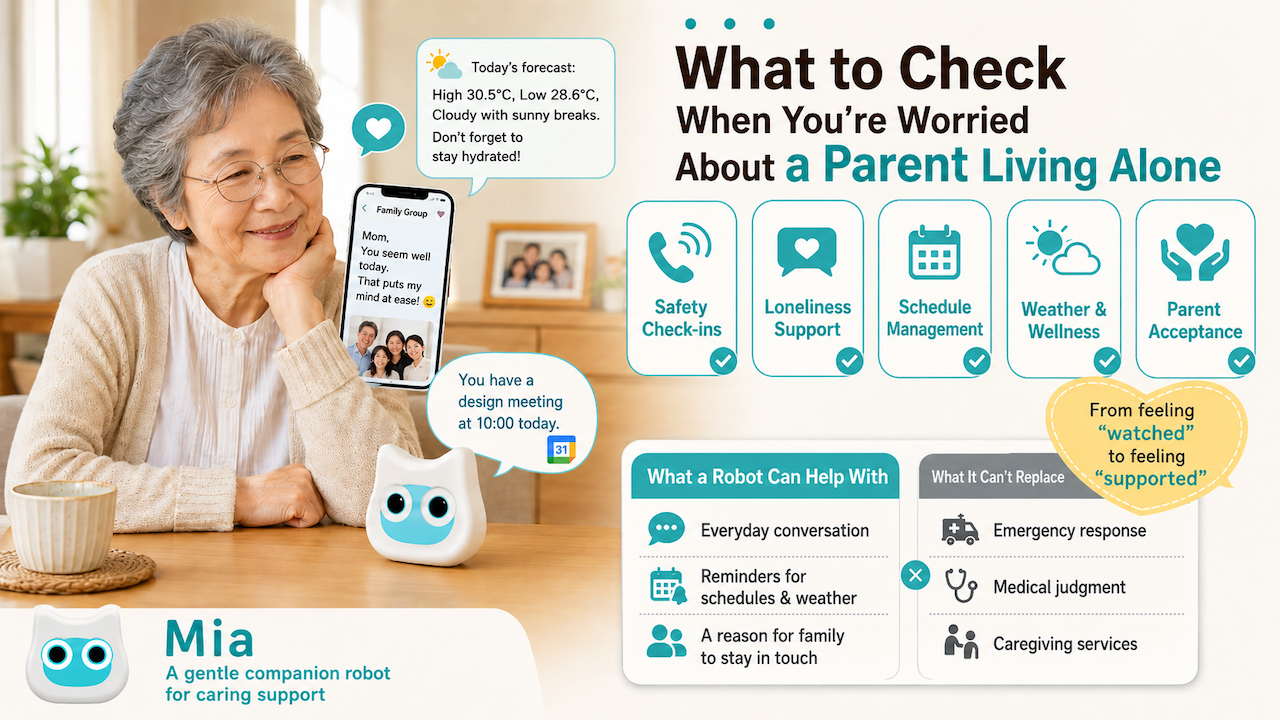
Key Points
What Families Should Watch For
- Safety and contact: Can you reach your parent, and is their daily rhythm stable?
- Loneliness: Do they have chances to hear a voice, speak, or feel noticed?
- Schedule management: Are appointments, medication, trash days, and family calls easy to remember?
- Weather and health cues: Do they notice heat, cold, rain, and outdoor conditions?
- Acceptance: Does the tool feel helpful rather than like surveillance?
What a Robot Can and Cannot Do
| A robot can help with | A robot cannot replace |
|---|---|
| Adding daily voice prompts | Emergency rescue response |
| Speaking weather and schedule reminders | Medical judgment or medication responsibility |
| Making a quiet room feel less empty | Family, community, or care services |
| Speaking in a familiar dialect or tone | Fall detection or urgent care by itself |
| Creating reasons for family contact | Professional caregiving |
A companion robot is not a complete monitoring system. It is better to think of it as a small tool that adds voice, reminders, and emotional presence to everyday life.
Common Concerns When a Parent Lives Alone
A Missed Call Can Feel Alarming
If your parent does not answer the phone, it is easy to worry. In reality, they may be bathing, shopping, napping, or simply away from the phone. From a distance, however, the family cannot see what is happening.
Rather than relying on long daily calls, it often works better to create light contact rules. For example, you might agree to call after dinner twice a week, send a simple message in the morning, or check in before medical appointments.
Schedules Become Harder to Notice
Medical visits, medication, trash collection, deliveries, family calls, and visitors all depend on memory and timing.
A paper calendar works only if your parent looks at it. A smartphone notification works only if the phone is nearby and the alert is noticed. A voice prompt from a robot can sit between these options: it turns a schedule into something spoken in the room.
Some Parents Do Not Say They Are Lonely
Many older adults avoid saying “I am lonely” because they do not want to worry their children. They may say “I’m fine” or “Don’t bother calling so often,” even when their days are quiet.
The goal is not to force constant conversation. The goal is to create natural chances for voice, routine, and small emotional contact.
First, Build a Basic Support Plan
Before adding a robot, it is important to set up the basics.
1. Create Gentle Contact Rules
Strict rules such as “call every morning at 8:00” can become stressful. Softer rules are easier to maintain.
| Rule example | Why it works |
|---|---|
| Call twice a week | Less pressure than calling every day |
| Send a short message in the morning or evening | Easy even when busy |
| Call before medical appointments | Focuses on important moments |
| Call only when there is no usual message | Preserves independence |
If your parent uses a smartphone, messaging apps can help. If not, use landline calls, visits, neighbors, or local support services.
2. Keep Emergency Contacts Visible
Place emergency contacts somewhere easy to find, such as near the phone, on the refrigerator, or by the entrance.
- Family phone numbers
- Primary doctor
- Pharmacy
- Care manager
- Local support center
- Trusted neighbors
This paper list matters even if you use apps or robots. In an emergency, simple visible information is often the most reliable.
3. Notice Changes in Daily Life
Monitoring does not mean watching every detail. It means noticing changes from the usual pattern.
- A weaker voice on the phone
- Fewer outings
- Less talk about meals
- Repeated stories increasing suddenly
- Mail or trash piling up
- Clothing that does not match the weather
These changes are easier to notice when the family has regular opportunities to talk.
How a Companion Robot Can Help
It Adds a Voice to a Quiet Room
A home where one person lives alone can be very quiet. Even if the television is on, it is still one-way sound.
When a robot says “Good morning,” “It looks like rain today,” or “Your appointment is coming up,” the room feels a little less empty. The point is not deep conversation. The point is that a voice appears naturally in daily life.
Mia is a small cat-shaped companion robot, so it can sit on a desk, shelf, table, or near the television without feeling like medical equipment.
Google Calendar Reminders Can Create Contact Cues
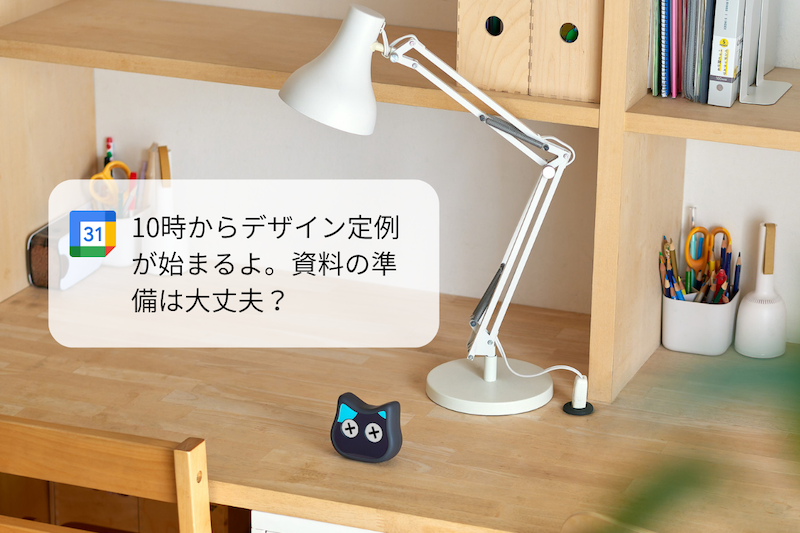
Mia can work with Google Calendar reminders. This is useful when the family wants to help organize important events without requiring the parent to check a phone screen.
For example, you can add:
- “Call family at 7 p.m. on Wednesday”
- “Internal medicine appointment at 10 a.m.”
- “Take out burnable trash tomorrow”
- “Visitor coming this afternoon”
The benefit is that the family can organize the schedule, while the parent receives it as a spoken prompt. A reminder becomes part of the room rather than another small notification on a phone.
For an elderly parent, keep calendar entries short and easy to understand when spoken aloud. “10 a.m. internal medicine” is clearer than a vague event title such as “clinic.”
Weather Voice Prompts Support Daily Decisions
Weather matters more as people age. Heat, cold, rain, strong wind, and sudden temperature changes can affect clothing, hydration, and whether it is a good day to go outside.
Mia can provide weather voice prompts. A spoken cue such as “It may rain today, so please bring an umbrella” or “It will be hot today, so remember to drink water” can help connect weather information to action.
This is especially useful for people who do not regularly check weather apps. The information reaches them through voice, not through another screen.
Dialect Voices Can Feel More Familiar
For many older adults, familiar speech patterns are emotionally important. A standard robotic voice can feel cold, while a familiar dialect can feel closer and easier to accept.
Mia supports 47 Japanese dialects. For a parent who has strong ties to a hometown or region, choosing a familiar dialect can make the robot feel less like a device and more like a friendly voice in the room.
The best choice is not always the family’s favorite dialect. It should be the voice your parent finds comfortable and easy to understand.
Recorded Family or Grandchild Voices Can Be Meaningful
Family voices can be powerful. A short message from a child or grandchild can feel warmer than a generic device notification.
Mia can be used with recorded family voice phrases. For example:
- “Good morning, Grandma.”
- “It’s your hospital day today.”
- “Please stay warm today.”
- “I’ll call you again soon.”
- “I love you.”
Short messages are usually better than long ones. If the phrase is related to medication or appointments, avoid sounding like an order. A gentle phrase such as “Please check your medicine after breakfast” is easier to accept than a strict command.
Using Mia for an Elderly Parent Living Alone
Main Features to Consider
| Feature | How it can help a parent living alone |
|---|---|
| Starts from ¥9,800 in Japan | Easier to try as a family gift |
| 47 Japanese dialects | Can use a familiar voice style |
| Facial expressions | Adds a visible presence to the room |
| Voice prompts | Adds spoken cues to daily life |
| Google Calendar integration | Can speak reminders for appointments and family calls |
| Weather updates | Helps with clothing, outings, and hydration |
| Recorded family voice phrases | Lets children or grandchildren deliver short messages |
| English character voices | Can become a small activity with grandchildren |
| Compact size | Easy to place on a table, shelf, or near a TV |
Mia is not a medical device or an emergency alert system. It should not be used as the only safeguard for falls, sudden illness, fire, wandering, or medication management. Its role is daily voice support, reminders, and emotional presence.

Good Places to Put the Robot
| Place | Why it works |
|---|---|
| Near the dining table | Easy to notice during meals and medication routines |
| Beside the TV | Often within view during the day |
| Near the entrance | Useful before going outside |
| Near the bedroom door | Useful for morning and evening prompts |
If your parent resists putting it in a prominent place, start with a natural location such as a shelf or TV area.
Calendar Ideas for Families
Start with only a few important reminders.
| Reminder | Example wording |
|---|---|
| Medical appointment | “Hospital appointment at 10 a.m. today” |
| Medication cue | “Please check your medicine after breakfast” |
| Trash day | “Tomorrow is burnable trash day” |
| Family call | “Call family on Wednesday evening” |
| Delivery or visitor | “A package may arrive this afternoon” |
| Hydration | “It is hot today, so please drink water” |
Too many reminders can become noise. Begin with a few that your parent actually finds useful.
Recorded Voice Phrase Ideas
Recorded family or grandchild messages work best when they are short and warm.
| Phrase | Use case |
|---|---|
| “Good morning, Grandma” | Morning greeting |
| “Please stay warm today” | Cold weather |
| “Please check your medicine” | Medication cue |
| “I’ll call you again soon” | Family contact |
| “I love you” | Emotional reassurance |
Start with a small number of phrases and check whether your parent enjoys them. Some people love hearing family voices; others may feel embarrassed or pressured. The parent’s comfort comes first.
How to Present the Robot as a Gift
Say “Helpful Voice Prompts,” Not “Monitoring”
If you say “I bought this to monitor you,” many parents will resist. It sounds like surveillance.
Try explaining it like this:
- “It can tell you the weather and your schedule by voice.”
- “It can remind you when we plan to call.”
- “It can speak in a familiar dialect.”
- “We can put a short message from your grandchild in it.”
This respects the parent’s independence and frames the robot as a helpful everyday tool.
Set It Up Together
Wi-Fi, app settings, calendar connection, volume, dialect, weather area, and recorded voice phrases should not be left entirely to the parent.
Check these together:
| Setting | What to check |
|---|---|
| Volume | Can they hear it over the TV? Is it too loud at night? |
| Location | Is there power nearby? Is it easy to see? |
| Dialect | Is the voice comfortable and clear? |
| Schedule reminders | Are there too many? |
| Weather area | Is it set to the correct location? |
| Family voice phrases | Are the messages welcome, not stressful? |
After a week, ask what feels useful and what feels annoying. Adjust based on the parent’s reaction.
Make It Easy to Stop
Do not make the gift feel like a duty. Say clearly that it is fine to move it, use it less, or stop using it if it does not fit.
Robots work best when they fit naturally into daily life. If they do not, use other options such as phone calls, visits, local services, or emergency alert systems.
Compare Other Support Options
No single tool is enough. A realistic plan combines several types of support.
| Method | Strength | Limitation |
|---|---|---|
| Phone or messaging | Direct family voice | Can burden the family |
| Visits | Directly confirms living conditions | Hard if the family lives far away |
| Monitoring appliances | Can suggest daily rhythm | May feel like surveillance |
| Emergency alert service | Strong for urgent situations | Does not reduce loneliness by itself |
| Smart speaker | Useful for information and voice control | May lack character and warmth |
| Companion robot | Good for voice prompts, presence, and reminders | Cannot handle emergencies or medical judgment |
The safest approach is role sharing. Emergency alert systems handle urgent risk. Family calls maintain relationships. Calendar reminders support routines. A companion robot adds voice and small daily prompts.

How to Choose a Robot for an Elderly Parent
1. Keep Operation Simple
Even a useful device will be ignored if it requires too many buttons, app steps, or settings.
2. Check Voice Clarity
Volume is not the only issue. Pitch, speed, accent, and pronunciation matter. Choose a voice your parent can hear comfortably.
3. Understand Monthly Costs
Some companion robots or AI services require monthly plans. Mia starts from ¥9,800 in Japan and basic use is available without a required monthly fee. Optional voice phrase expansion may require an additional paid option, so check current terms before using advanced customization.
4. Choose a Design They Accept
Some parents like cute devices. Others find them childish. The best robot is one they are willing to keep in the room.
5. Make Sure the Family Can Support It
Buying and sending the device is not enough. Plan to help with setup, placement, volume, Wi-Fi, reminders, and follow-up.
Pre-Installation Checklist
| Check | Why it matters |
|---|---|
| Does the parent agree to try it? | Forced tools are rarely used |
| Is Wi-Fi available? | Weather and calendar features may need it |
| Is there a good power location? | Placement affects daily use |
| Is the volume clear? | It must be heard over TV and room noise |
| Are reminders limited? | Too many prompts become background noise |
| Are family voice phrases welcome? | A warm message can also feel awkward if unwanted |
| Can the family help with setup? | Initial setup is often the biggest barrier |
| Is there a separate emergency plan? | Do not rely on a robot alone |
FAQ
Is a robot enough to monitor an elderly parent living alone?
No. A robot can help with daily voice prompts and reminders, but it cannot handle emergencies by itself. Use family contact, local support, and emergency services as needed.
Can a parent who is not good with technology use it?
Yes, if the family handles setup and keeps daily operation simple. Do not expect the parent to manage apps, Wi-Fi, calendar settings, and voice phrases alone.
Will a robot feel like surveillance?
It depends on how you present it. Introduce it as a helpful voice prompt device, not as a monitoring device. If the parent dislikes it, do not force it.
Can Mia be used as a talking companion for older adults?
Mia can add daily voice prompts, dialect phrases, weather updates, and schedule reminders. It can make the room feel less silent. However, it does not replace human conversation, caregiving, or family contact.
Can Mia play a grandchild’s recorded voice?
Yes. Short recorded family messages can be used as warm prompts. Use gentle phrases such as “Good morning,” “Please stay warm,” or “I’ll call you soon.” Avoid turning every message into a command.
What if the parent’s home does not have Wi-Fi?
Weather and Google Calendar features may be limited without internet access. Consider a home router, smartphone tethering during setup, or simpler non-internet support methods.
Can this help a parent with dementia?
It depends on the person’s condition. Voice prompts may feel reassuring for some people, but confusing for others. If dementia symptoms are present, discuss the idea with a doctor, care manager, or local support professional before relying on it.
Summary
When an elderly parent lives alone, the family naturally worries. But daily calls, frequent visits, and constant checking are not always sustainable.
The goal is to combine contact rules, emergency information, local support, and gentle daily cues. Mia can help by adding voice prompts, Google Calendar reminders, weather updates, familiar dialects, facial expressions, and recorded family messages.
Use it as a way to add voice and routine, not as a way to control or monitor your parent. A small voice in the room can become a practical cue for appointments, weather, family contact, and a little emotional reassurance.
👀 You may also like:
👉 2026 Guide: AI Pet Robots for Elderly Loneliness – A Comparison of 10 Companion Robots
👉 2026 Edition: 9 Recommended Pet Robots Under $150 – Cheap, Cute, and Healing Models
👉 Monthly and Maintenance Costs of Pet Robots: Moflin, LOVOT, Mia, and More
👉 Mia – Your Chatty AI Cat Companion Robot with 100+ Expressions