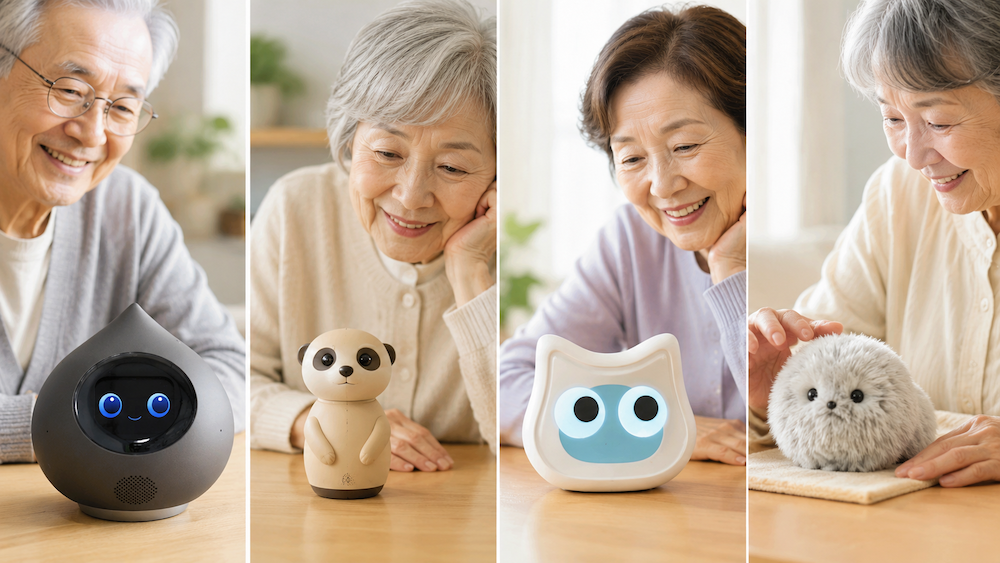
If you're looking for something to keep an elderly parent company — something that talks to them, not just waits to be spoken to — you're in the right place.
We compared 8 models on the key factors that matter for elderly users: whether the robot initiates conversation, Wi-Fi requirements, monthly costs, and ease of use. We've also included Mia's two-way Conversation Model, which launched in August 2026 and has gained new features since.
- "Talks to you first" vs "Answers when spoken to" — the difference matters
- Overseas newcomer: Rhem, with health tracking (not sold in Japan)
- Another overseas example: Komp, a screen that connects seniors with family (not sold in Japan)
- 8-model comparison table
- Mia's Conversation Model: available since August 2026
- Three things to check before choosing
- Which model fits your situation
- FAQ
- Summary
"Talks to you first" vs "Answers when spoken to" — the difference matters
This is the single most important thing to understand before choosing a companion robot for an elderly parent.
Robots that initiate conversation speak up on their own — a morning greeting, the weather, a reminder. The elderly user doesn't have to do anything. For someone who lives alone and might not feel like reaching out, a voice that appears without prompting can be surprisingly effective.
Devices that answer when spoken to — like smart speakers — require the user to make the first move. That works well for active users, but for someone who is withdrawn or easily forgets to interact, the habit doesn't always form naturally.
Two-way conversation models can do both. Romi and Mia's Conversation Model (available since August 2026) both fit here, and Mia also keeps speaking up on her own with daily voice prompts.
Overseas newcomer: Rhem, with health tracking (not sold in Japan)
The models above are available in Japan, but overseas a new type of elder-focused robot is appearing that combines conversation, health logging and check-ins.
Rhem is a tabletop robot from Rhem Labs in the U.S. It records blood pressure, heart rate and SpO₂, shares data through a family app, uses AI to handle phone and web errands, and includes a radar-based Halo fall detector.
- Price: $1,099 (Cloud) or $1,299 (Local), with one Halo included. 24 months of Plus are included, then $19/month
- Availability: U.S. preorders only, shipping from January 2027
- Languages: English, Chinese, Spanish and French (Japanese not listed)
- Caution: Rhem states its readings are not for diagnosis or medical decisions
Because it cannot be bought in Japan today, it is not in the comparison table. It is useful as a look at where elder-care robots are heading.

Another overseas example: Komp, a screen that connects seniors with family (not sold in Japan)
Komp, developed by Norway's No Isolation, does not talk on its own. It is a one-button screen that delivers photos, messages, and video calls from family to older adults. Calls connect automatically after 10 seconds, so the senior hardly needs to do anything.
It is not sold in Japan and requires a monthly fee, so it is not in the table below, but it shows a different idea: not a conversation partner, but a window for talking with family.
8-model comparison table
| Model | Robot initiates | Two-way chat | Works without Wi-Fi | Price (approx.) | Monthly fee | Dialect support |
|---|---|---|---|---|---|---|
| Mia (Standard) | ○ | × | ○ | $149〜 | $0 | 47 Japanese dialects |
| Mia (Conversation Model) | ○ | ○ | ○ (core features; chat needs Wi-Fi) | $199 | $2/month (up to 5 hours) | 47 Japanese dialects (chat replies in Osaka or Hakata dialect) |
| Romi | △ | ○ | × | ~$300 | ~$15/month | × |
| Chapit | ○ | △ | ○ | ~$100 | $0 | × |
| BOCCO emo | ○ (family messages) | × | × | ~$300 | Paid plan | × |
| Nicobo | ○ | △ | × | ~$400 | Paid plan | × |
| An'An | ○ | △ | × | ~$200 | Paid plan | × |
| Amazon Echo Dot | × | ○ | × | ~$30–50 | $0 | × |
Prices and specs subject to change. Check manufacturer websites for the latest.
Mia's Conversation Model: available since August 2026
Since August 2026, Mia has offered a two-way conversation mode on the Conversation Model, so you can have a real back-and-forth with the robot.
How it works
- Requires the Conversation Model (US$199) and the $2/month Premium plan (up to 5 hours of conversation per month)
- Tap Mia's head once to start a conversation
- Speak naturally, and Mia replies
- The session ends when you tap again, or automatically after 3 minutes of silence
What stays the same
Mia's daily dialect greetings, weather updates, and Google Calendar reminders work the same on both the Standard Model and the Conversation Model. Conversation mode adds real conversation on top of those features.
New in November 2026: features that help older family members
- Talk to her in English: speak English and Mia answers in English. Choose from 7 English voices, and Mia switches between Japanese and English automatically based on the language you use. (English conversation voices)
- She remembers what you told her: family names, plans, favorite things, and things that happened. Mia brings them up in later conversations, and asks how a plan went after the date passes. You can review and delete what she remembers in the app, and she does not keep health, money, or address details. (What Mia remembers)
- Pick her voice and speed: 15 voices you can preview, and speaking speed from 0.8x to 1.2x. (Voice and speed)
- Polite or casual, and two personalities: choose a gentle polite tone or a casual, friend-like tone. White Mia is easygoing and Black Mia is the reliable one, and her personality in conversation follows the color you set. In Japanese, replies can also be in the Osaka or Hakata dialect. (Tone, dialect, and personality)
- Alarms by voice: say “Set an alarm for 7” or “Wake me up in 30 minutes.” Repeat on weekdays or every day, pick from 5 sounds, and tap her head to stop it. (Using the alarm)
- A weekly letter for family: every Sunday at 6 p.m., family members get a short note with the days Mia was petted and how many times and minutes she chatted. What was said is never sent. (Mia’s weekly letter)
For older parents, three things stand out: she remembers what they told her ("Did your grandson visit?"), she can speak more slowly, and the weekly letter lets family see that Mia is being used without sharing what was said.
Get the Conversation Model: Mia Conversation Model (White) / Mia Conversation Model (Black) (official store)

Three things to check before choosing
1. Does it speak up on its own?
For elderly users who may not always feel like initiating, a robot that speaks first matters more than one that only answers. Mia and Chapit both initiate proactively — Alexa-style devices do not.
2. Does it work without Wi-Fi?
Many models — Romi, BOCCO emo, Nicobo — require a Wi-Fi connection. If your parent's home doesn't have Wi-Fi, or if managing a router is a barrier, look for a model that works offline. Mia's core features work without Wi-Fi.
3. What does it cost per month?
Romi runs ~$15/month for its AI service. Nicobo and BOCCO emo also have ongoing subscription fees. Mia's standard model has no monthly fee (optional $2/month for extras). For a gift to an older parent, buy-once models are often easier to sustain long-term.
Which model fits your situation
Parent who'd love to hear their hometown dialect → Mia
Mia speaks 47 regional Japanese dialects — Kansai, Kyushu, Tohoku, and more. A standout feature for parents who grew up speaking a regional dialect.
You want two-way conversation right now → Romi
Romi has the most polished two-way conversation among currently available models. Monthly fee applies.
You want to send voice messages from afar → BOCCO emo
Record a message on your phone; BOCCO emo plays it back in your parent's room. Replies are also supported.
Looking for a low-cost starting point → Mia (Standard)
At $149 with no monthly fee, Mia is the most accessible entry point — and it already speaks up on its own without being prompted.
FAQ
Q. When will Mia's two-way conversation mode be available?
A. It has been available since August 2026. It requires the Conversation Model (US$199) and the $2/month Premium plan. You can talk to her in Japanese or English.
Q. What if my parent doesn't have Wi-Fi at home?
A. Mia and Chapit both work without Wi-Fi for their core features. Romi, BOCCO emo, and Nicobo require a Wi-Fi connection.
Q. Can companion robots help prevent dementia?
A. These are not medical devices and are not designed to treat or prevent dementia. They're best thought of as daily social stimulation tools — a gentle voice in the room.
Q. Can multiple family members manage one robot?
A. Yes, Mia's app supports multiple family members. Each person can send voice messages and adjust settings independently.
Summary
| Situation | Best pick |
|---|---|
| Want daily dialect greetings | Mia (Standard) |
| Want two-way conversation that remembers you | Mia (Two-way model) |
| Want to send family voice messages | BOCCO emo |
| Want two-way conversation right now | Romi |
| Best value, low ongoing cost | Mia Standard |
For most families looking for a companion robot for an elderly parent, the decision comes down to what the parent needs most right now — and what's sustainable over time. Mia's combination of proactive dialect greetings, no monthly fee, and offline capability makes it the most practical starting point in 2026, and the Conversation Model adds two-way conversation, memory, and voice alarms when you want more.
👀 You may also like:
👉 2026 Guide: AI Pet Robots for Elderly Loneliness – A Comparison of 10 Companion Robots
👉 2026 Edition: 9 Recommended Pet Robots Under $150 – Cheap, Cute, and Healing Models
👉 Monthly and Maintenance Costs of Pet Robots: Moflin, LOVOT, Mia, and More
👉 Mia – Your Chatty AI Cat Companion Robot with 100+ Expressions