Mia | Page 9 | Mia

Mia

Phrases

Mia English mode now has a “Friendly” personality! Positive and energetic phrases

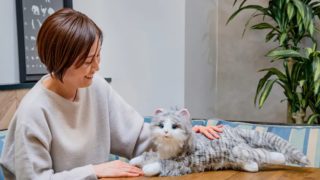
A cheerful and positive “Friendly” version of the English mode for the cat-shaped robot Mia is now available! It is full of phrases that will energize your daily life. It is also recommended for English learning and as a therapeutic item.
How to & Features

[New function] Multiple devices can now be registered and named.

The Mia app has been updated! You can now manage multiple Mias with a single account. Nickname settings and individual settings for each device are also supported. To use these convenient new features, you need to update to the latest version of the app (1.10.1).
How to & Features

[New feature] Mia supports English mode! You can enjoy 5 different personalities and 3 different accents!

The cat-shaped robot “Mia” now supports English mode! It plays everyday greetings and encouraging phrases in easy English. You can choose from five personalities and three accents (British English, Indian English, and Australian English) and play pre-recorded English phrases at random.
Pet Robot News & Insights

Thorough Comparison of 9 Recommended Pet Robots Under $150 in 2026 Edition|Cheap, Cute, and Healing Models

【2026 Latest】A Comprehensive Comparison of Affordable Pet Robots Under $150. Covering Popular Models from Mea, Takara Tomy, Yukai Engineering, and More. Introducing Options for Kids, Seniors, and Gifts, Explaining Price, Features, and User Reviews. A Special Feature on Recommended Robots Packed with Comfort and Fun, Even at Low Prices.
How to & Features

How to initialize the Mia device

If your Mia cat robot stops talking or its eyes don’t move, and restarting doesn’t help, try initializing the device. You’ll need a Phillips screwdriver to open the unit and follow steps to enter Safe Mode. Easy-to-follow for beginners.
How to & Features

[New feature] A mute function has been added.

The mute function has now been added to Mia.What is the mute function?This feature allows Mia to stop talking even durin...
Mia Development Story

Until Mia’s design was completed: with an eye toward mass production

In the early days, I used a 3D printer to print the design of Mia's body through trial and error, but it didn't turn out to be a pretty design, and I felt I had reached my limits along the way. In this interview, we asked Mr Inada what he was particular about when designing Mia, and how he designed the chassis with mass production in mind.
Mia Development Story

Struggled with designing a full-scale electronic circuit for the first time

Hello everyone.Mia, this is Yoshinaga, the developer.In a previous article here, I described the impetus for the develop...
Mia Development Story

My motivation for Mia’s development

A heartfelt story by Mia’s developer, Dr. Yoshinaga, sharing how experiences as a visiting physician and love for local dialects inspired the creation of Mia, a cat-shaped robot designed to bring comfort and communication to the lonely.
Copied title and URL